v2.0.0 Plugin per GitHub Copilot (VS Code e CLI) Plugin for GitHub Copilot (VS Code and CLI)

Dal requisito alla demo Dataverse, in un pomeriggio. From requirements to a Dataverse demo, in an afternoon.

Un orchestratore e dieci sotto-agenti trasformano requisiti e verbali in un prototipo navigabile in stile Dynamics 365, poi lo realizzano in un ambiente DEV. Il lavoro meccanico lo fanno script deterministici: gli agenti pensano solo a decisioni e contenuti.

An orchestrator and ten sub-agents turn requirements and meeting notes into a clickable Dynamics 365-style prototype, then build it in a DEV environment. Deterministic scripts do the mechanical work, so agents only spend tokens on decisions and content.

  • Dataverse
  • Dynamics 365 CE
  • Power Platform
  • GitHub Copilot
Output a scopo illustrativo.Illustrative output.
11 AgentiAgents 1 orchestratore, 10 specialisti nascosti 1 orchestrator, 10 hidden specialists
8 SkillSkills init, planner, schema, model-driven, code app… init, planner, schema, model-driven, code app…
3 Stage con gateGated stages prototipo, DEV, rilascio prototype, DEV, release
0 Token negli scriptTokens in scripts scaffold, build, test, preflight scaffold, build, test, preflight

Perché serveWhy it matters

Una POC deve convincere presto, senza promettere troppo.

A POC has to convince early, without overpromising.

⏱️

Prototipi lenti

Slow prototypes

Schermate, dati demo e navigazione si descrivono in YAML; un renderer generico li disegna in stile Dynamics 365. Nessun HTML scritto a mano.

Screens, demo data and navigation are described in YAML; a generic renderer draws them in Dynamics 365 style. No hand-written HTML.

🎭

Demo scambiate per software

Demos mistaken for software

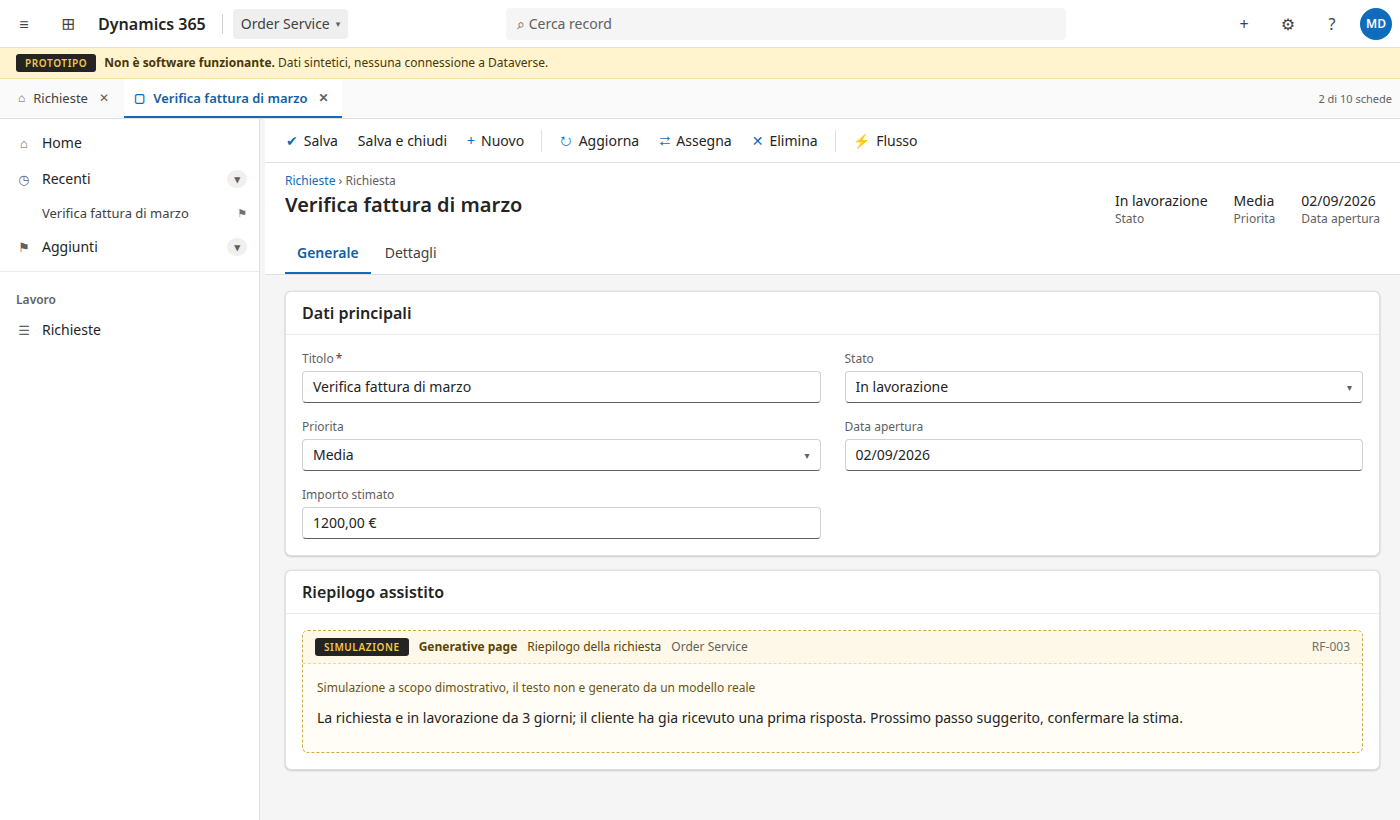
Generative page e PCF sono simulati con un badge «Simulazione» sempre visibile: lo sponsor vede la direzione, non una promessa.

Generative pages and PCF controls are simulated with an always-visible “Simulation” badge: sponsors see the direction, not a promise.

🛡️

Ambienti a rischio

Environments at risk

Stage gate confermati, preflight a script sul piano, tutto dentro la solution e un hook che chiede conferma prima di cancellare o cambiare ambiente.

Confirmed stage gates, scripted preflight against the plan, everything inside the solution and a hook that asks before deleting or switching environments.

💸

Costi AI imprevisti

AI cost surprises

Scaffold, validazione, build, smoke test, preflight e verifica degli zip sono script: gli agenti leggono un riepilogo JSON invece di ragionare sui file.

Scaffold, validation, build, smoke test, preflight and zip checks are scripts: agents read a JSON summary instead of reasoning over files.

Cosa ottieniWhat you get

Tutto quello che serve a una POC su Power Platform.

Everything a Power Platform POC needs.

🖥️

Prototipo fedele a D365

Dynamics 365-faithful prototype

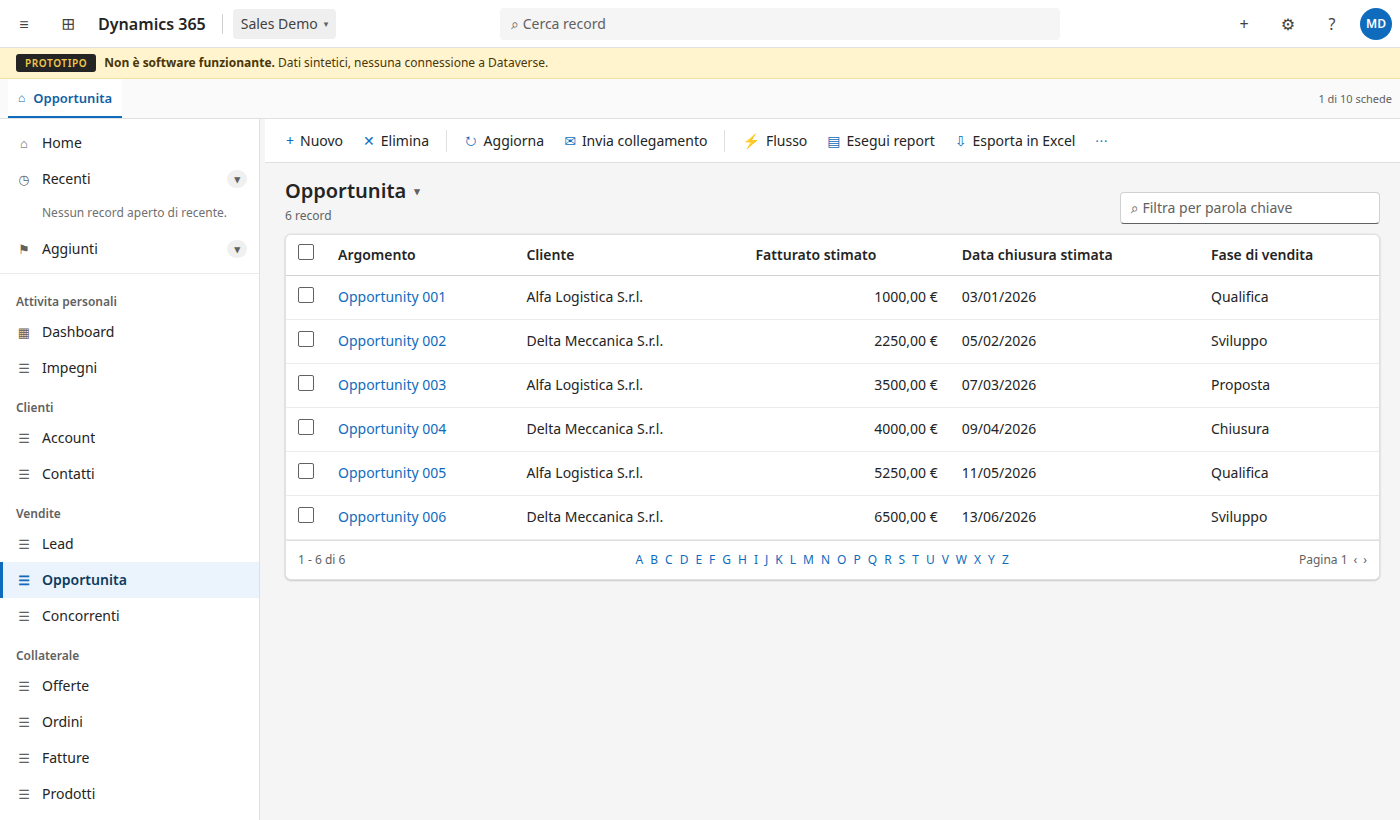
Site map, viste, moduli, Fluent 2 e Segoe UI. Schede di sessione solo per Customer Service Workspace richiesto esplicitamente. Un solo file HTML da aprire con un doppio clic.

Site map, views, forms, Fluent 2 and Segoe UI. Session tabs only when Customer Service Workspace is explicitly requested. One HTML file that opens with a double click.

🧩

Model-driven o code app

Model-driven or code app

La scelta si fa con l'utente, mai per deduzione. La code app ha la sua shell, senza chrome D365, e diventa poi una Power Apps code app reale.

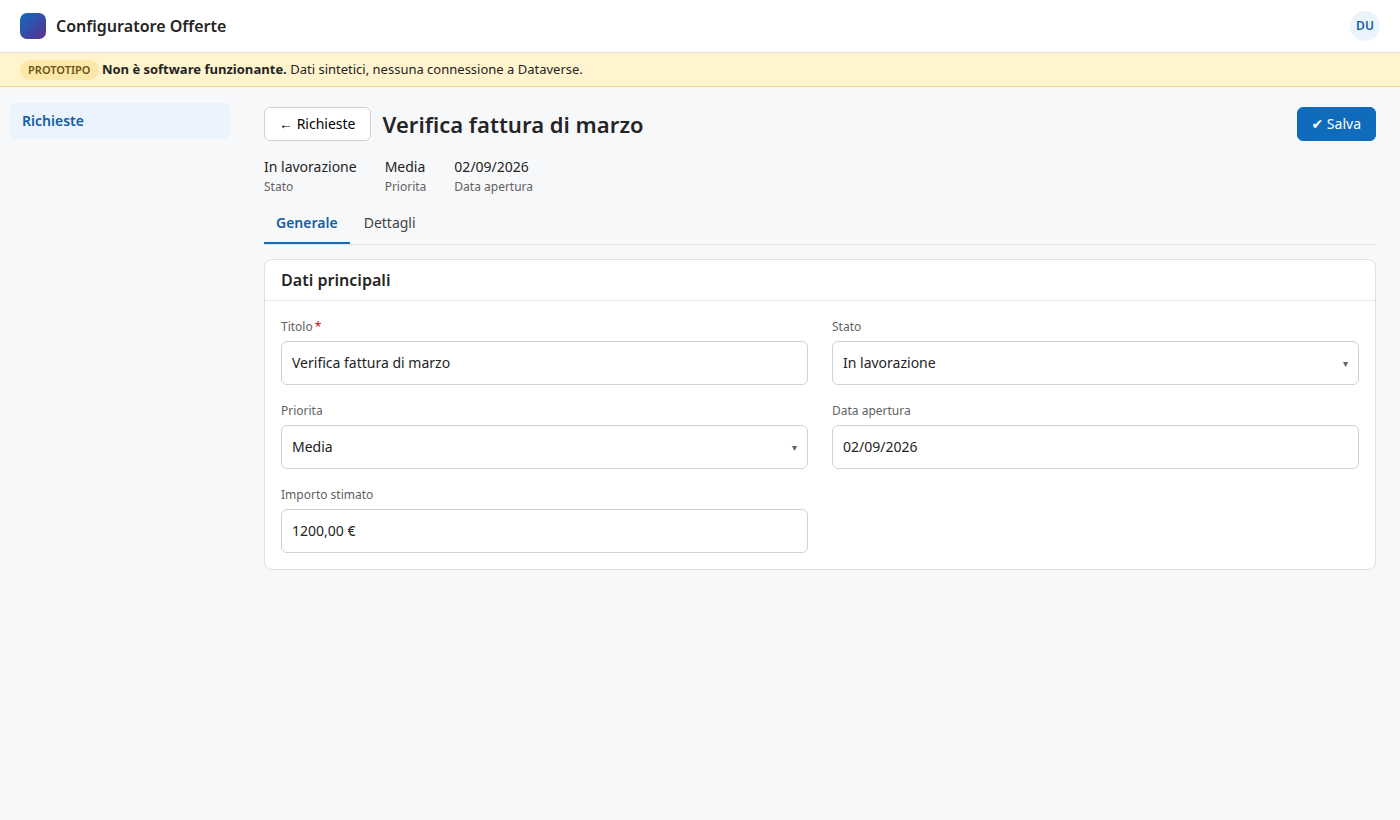
The choice is made with you, never inferred. Code apps get their own shell without D365 chrome, and later become a real Power Apps code app.

🗃️

Datamodel standard-first

Standard-first data model

Prima di ogni tabella custom si verifica lo standard su Microsoft Learn e si documenta la decisione. Baseline Sales Hub e Customer Service Hub pronte.

Before any custom table, the standard one is checked on Microsoft Learn and the decision is documented. Sales Hub and Customer Service Hub baselines included.

✅

Copertura dei requisiti

Requirements coverage

Ogni schermata, campo e componente dichiara i requisiti che copre; la build produce il report e segnala quelli scoperti.

Every screen, field and component declares the requirements it covers; the build produces the report and flags the uncovered ones.

⚙️

Realizzazione in DEV

Build in DEV

Tabelle, colonne, choice, form, viste, sitemap, generative page, PCF, web resource e code app con PACX, PAC e AppMaker.

Tables, columns, choices, forms, views, site map, generative pages, PCF, web resources and code apps with PACX, PAC and AppMaker.

🧪

Verifica indipendente

Independent verification

Smoke test Playwright su ogni app e area, verifica dei metadata e degli zip esportati. Nulla è «funzionante» finché non è verificato.

Playwright smoke tests across every app and area, metadata and exported-zip checks. Nothing is “working” until verified.

Come funzionaHow it works

Un orchestratore, specialisti nascosti, script per il resto.

One orchestrator, hidden specialists, scripts for the rest.

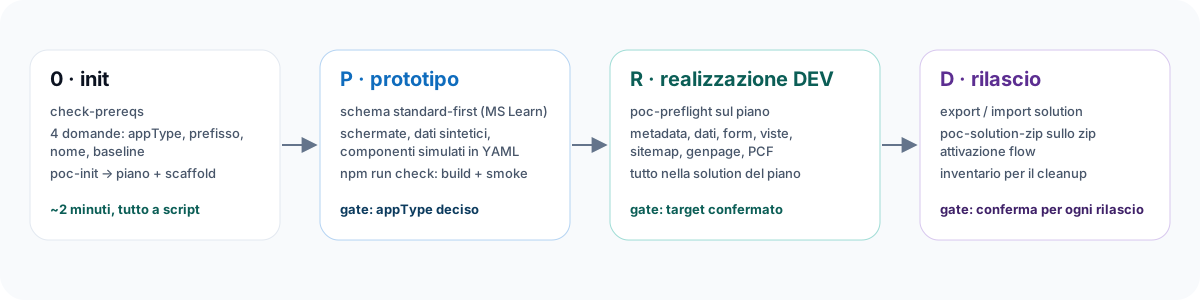
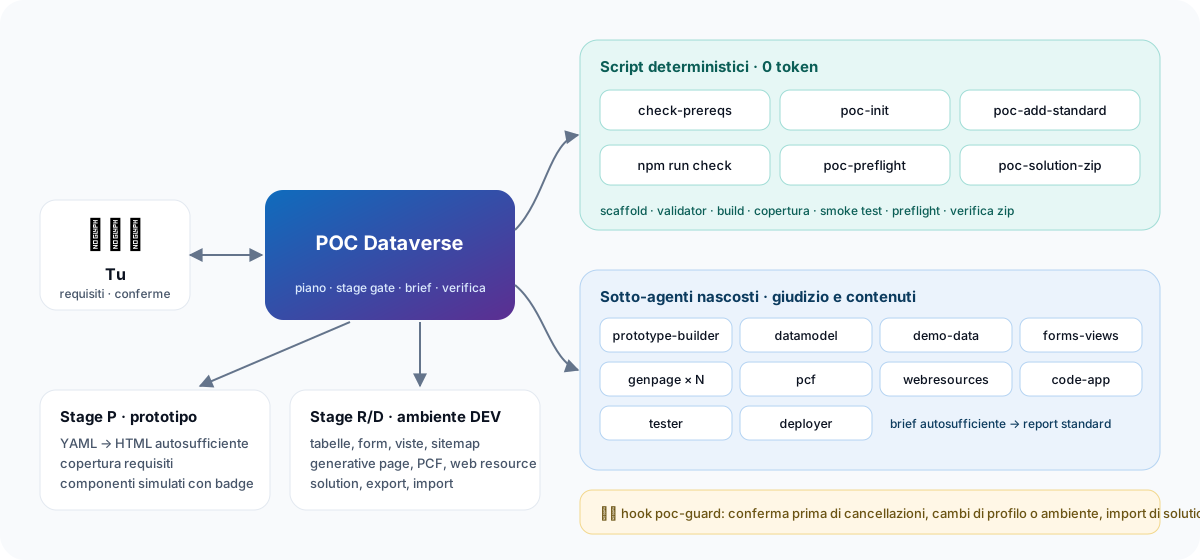
L'orchestratore pianifica, apre gli stage con la tua conferma, delega con brief autosufficienti e consolida i report nel piano della POC.

The orchestrator plans, opens stages with your confirmation, delegates with self-contained briefs and consolidates reports into the POC plan.

The user talks to the orchestrator, which runs deterministic scripts and delegates to ten sub-agents; the output is a prototype and, in stage R, a solution in a DEV environment
Init, stage P prototype, stage R build in DEV, stage D release, each opened by a confirmed gate
  • Gli stage non si aprono per inferenza: il target ambiente sta nel piano e lo conferma l'utente.
  • Stages never open by inference: the target environment lives in the plan and is confirmed by you.
  • Due sotto-agenti non lavorano mai sullo stesso artefatto; più generative page vanno in parallelo.
  • Two sub-agents never touch the same artifact; multiple generative pages run in parallel.
  • Ogni report distingue verificato, non verificato e simulato.
  • Every report separates verified, unverified and simulated.

ScriptScripts

Il lavoro meccanico non passa da un modello.

Mechanical work never goes through a model.

Node puro, senza dipendenze, output JSON compatto: più veloce, ripetibile e verificabile in CI.

Plain Node, no dependencies, compact JSON output: faster, repeatable and testable in CI.

check-prereqsNode, npm, browser, pac, pacx, profili e server MCP per lo stage P o R.Node, npm, browser, pac, pacx, auth profiles and MCP servers for stage P or R.
poc-initScaffold, esempi, piano, npm install e primo check in un comando.Scaffold, samples, plan, npm install and first check in one command.
poc-add-standardBaseline Sales Hub o Customer Service Hub con dati sintetici.Sales Hub or Customer Service Hub baseline with synthetic data.
npm run checkValidator, runtime, HTML statico, copertura e smoke test Playwright.Validators, runtime, static HTML, coverage and Playwright smoke test.
poc-preflightProfili PAC e PACX attivi contro il target del piano, prima di ogni scrittura.Active PAC and PACX profiles against the plan target, before any write.
poc-solution-zipVersione, componenti e generative page di uno zip esportato.Version, components and generative pages of an exported zip.
0token negli script meccanicitokens in the mechanical scripts

Demo

Quello che vede lo sponsor.

What your sponsor sees.

Prototipi generati dallo scaffold, senza una riga di HTML scritta a mano. Dati interamente sintetici.

Prototypes generated by the scaffold, without a single hand-written line of HTML. Fully synthetic data.

IniziaGet started

Operativo in dieci minuti.

Up and running in ten minutes.

  1. Abilita i plugin in VS CodeEnable plugins in VS Code Impostazioni → Chat › Plugins: Enabled.Settings → Chat › Plugins: Enabled.
  2. Aggiungi il marketplaceAdd the marketplace Lo slug del repository in chat.plugins.marketplaces.The repository slug in chat.plugins.marketplaces.
  3. Installa il pluginInstall the plugin Extensions → cerca @agentPlugins dataverse-poc.Extensions → search @agentPlugins dataverse-poc.
  4. Scegli l'orchestratore e scrivi initPick the orchestrator and type init Verifica dei requisiti, domande iniziali, scaffold e primo check.Prerequisite check, initial questions, scaffold and first check.
settings.json
"chat.plugins.enabled": true,
"chat.plugins.marketplaces": [
  "raythekool/power-platform-plugins"
]

Preferisci il terminale? GitHub Copilot CLI

Prefer the terminal? GitHub Copilot CLI

shell
copilot plugin marketplace add raythekool/power-platform-plugins
copilot plugin install dataverse-poc@power-platform-plugins

Init senza chat

Init without chat

shell
node plugins/dataverse-poc/scripts/check-prereqs.mjs
node plugins/dataverse-poc/scripts/poc-init.mjs --root POC/OrderService \
  --app-type model-driven --prefix ava_ --name "Order Service" --hub sales-hub

Requisiti: Node.js 18+ ed Edge o Chrome per il prototipo; pac, pacx e i profili di autenticazione solo per la realizzazione in DEV. Guida completa: tutorial di init.

Requirements: Node.js 18+ and Edge or Chrome for the prototype; pac, pacx and auth profiles only for the DEV build. Full guide: init tutorial (Italian).

FAQ

Domande frequenti.

Good questions.

Serve un ambiente Dataverse per iniziare?Do I need a Dataverse environment to start?

No. Lo stage P produce un prototipo statico con dati sintetici: bastano Node.js e un browser. L'ambiente serve solo dallo stage R, dopo la tua conferma.

No. Stage P produces a static prototype with synthetic data: Node.js and a browser are enough. An environment is only needed from stage R, after your confirmation.

Posso usare dati reali del cliente?Can I use real customer data?

No. I dati demo sono sempre sintetici; il validator dei dati segnala email non su domini demo, IBAN e codici fiscali.

No. Demo data is always synthetic; the data validator flags non-demo email domains, IBANs and Italian tax codes.

Cosa impedisce di toccare l'ambiente sbagliato?What stops it from touching the wrong environment?

Il preflight confronta i profili attivi con il piano e si ferma se non coincidono; l'hook poc-guard chiede conferma prima di cancellazioni, cambi di profilo e import. Nessuna cancellazione senza autorizzazione esplicita.

The preflight compares active profiles with the plan and stops on mismatch; the poc-guard hook asks before deletions, profile switches and imports. No deletion without explicit authorization.

Model-driven o code app?Model-driven or code app?

Se la UI nasce da record, viste e moduli, model-driven (con generative page e PCF nei punti custom). Se il valore sta in un'interazione disegnata su misura, code app. Nel dubbio si parte da model-driven.

If the UI comes from records, views and forms, model-driven (with generative pages and PCF where custom). If the value is a bespoke interaction, code app. When in doubt, start model-driven.

È adatto a un progetto di delivery?Is it meant for delivery projects?

No: è pensato per POC e demo in ambienti DEV. Le decisioni di datamodel e i contratti YAML però diventano una specifica utile per chi implementa.

No: it targets POCs and demos in DEV environments. Data model decisions and YAML contracts still become a useful specification for the delivery team.

Funziona con Claude Code?Does it work with Claude Code?

Il plugin usa il formato di GitHub Copilot (VS Code e Copilot CLI). Gli script sono Node puro e funzionano da qualsiasi terminale.

The plugin uses the GitHub Copilot format (VS Code and Copilot CLI). The scripts are plain Node and run from any terminal.

La prossima demo Dataverse parte da init.

Your next Dataverse demo starts with init.