v3.3.1 Plugin for GitHub Copilot (VS Code, CLI) and Claude Code Plugin per GitHub Copilot (VS Code, CLI) e Claude Code

Documentation that stays aligned with the code. Documentazione sempre allineata al codice.

LLM Wiki turns code, platform metadata, work items, FDD/TDD and meeting minutes into a governed, cross-linked wiki for Dynamics 365 projects, and publishes it to Azure DevOps Wiki or GitHub Wiki.

LLM Wiki trasforma codice, metadati della piattaforma, work item, FDD/TDD e verbali in una wiki collegata e governata per i progetti Dynamics 365, e la pubblica su Azure DevOps Wiki o GitHub Wiki.

  • Power Platform
  • Finance & Operations
  • Azure DevOps
  • GitHub Copilot
Illustrative output.Output a scopo illustrativo.
5 SkillsSkill init, config, update, ingest, query init, config, update, ingest, query
3 ProfilesProfili Power Platform, F&O, generic Power Platform, F&O, generico
6 TemplatesTemplate FDD, TDD, ADR, minutes… FDD, TDD, ADR, verbali e altri
0 Tokens in scriptsToken negli script inventory, delta, lint, publish inventario, delta, lint, pubblicazione

Why it mattersPerché serve

Documentation usually loses against the delivery pace.

La documentazione di solito perde contro il ritmo di delivery.

LLM Wiki attacks the four reasons why.

LLM Wiki affronta i quattro motivi.

🧭

Docs drift from reality

I documenti si disallineano

FDD and TDD describe intent; the code is what runs. As-built pages are generated from the code and every gap is flagged as drift.

FDD e TDD descrivono l'intenzione; il codice è ciò che gira. Le pagine as-built nascono dal codice e ogni differenza è segnalata come drift.

🧩

Knowledge is scattered

La conoscenza è dispersa

Minutes, transcripts, specs, work items and repositories live in different tools. One Markdown wiki, one catalog, one place to ask.

Verbali, trascrizioni, specifiche, work item e repository vivono in strumenti diversi. Una wiki Markdown, un indice, un solo posto dove chiedere.

📐

Every project, a new format

Ogni progetto, un formato

Standard templates for requirements, design, ADR, minutes and code components give every team the same structure.

Template standard per requisiti, design, ADR, verbali e componenti di codice danno a tutti i team la stessa struttura.

💸

AI cost surprises

Costi AI imprevisti

Scripts do the mechanical work. The agent only reads inventories and files that changed, and every run logs what it processed.

Gli script fanno il lavoro meccanico. L'agente legge solo inventari e file cambiati, e ogni esecuzione registra cosa ha elaborato.

What you getCosa ottieni

Built for Dynamics 365 delivery teams.

Pensata per i team di delivery Dynamics 365.

🧬

Code-first as-built

As-built dal codice

Azure Repos, GitHub, TFS (TFVC) or plain folders: plugins, PCF, web resources, flows, pipelines and X++ are inventoried and documented with diagrams.

Azure Repos, GitHub, TFS (TFVC) o semplici cartelle: plugin, PCF, web resource, flow, pipeline e X++ vengono inventariati e documentati con diagrammi.

🏭

Dataverse and F&O aware

Dataverse e F&O

Ax* metadata, Chain of Command extensions, data entities and security on one side; solutions, plugins and data model on the other.

Metadati Ax*, estensioni Chain of Command, data entity e sicurezza da una parte; soluzioni, plugin e modello dati dall'altra.

📥

FDD, TDD and minutes in

FDD, TDD e verbali in ingresso

One page per requirement, design pages, ADRs and meeting syntheses with decisions, actions and risks. Word, PDF and Excel are converted automatically.

Una pagina per requisito, pagine di design, ADR e sintesi delle riunioni con decisioni, azioni e rischi. Word, PDF ed Excel vengono convertiti in automatico.

🛡️

Governed content

Contenuti governati

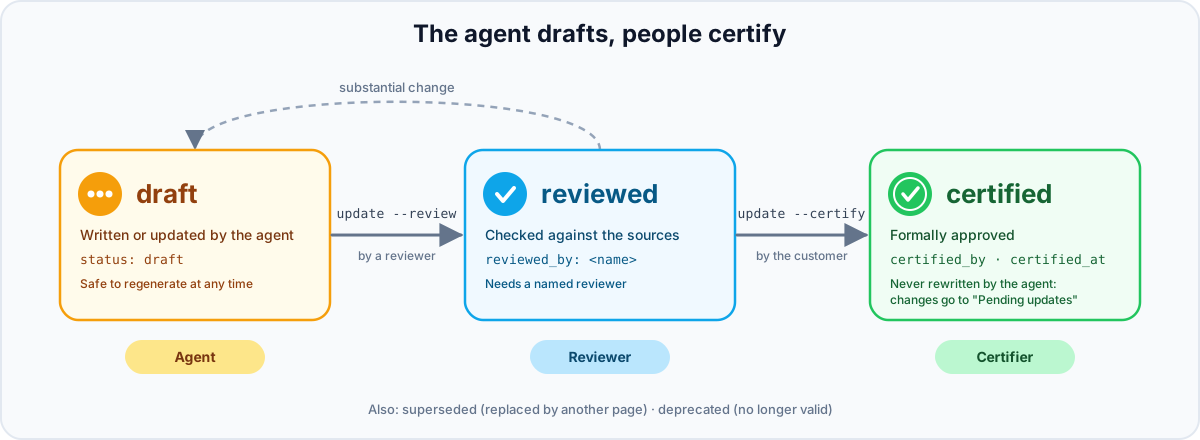
Owner, sources and lifecycle on every page. The agent drafts; people review and certify. Certified pages are never rewritten.

Owner, fonti e ciclo di vita su ogni pagina. L'agente scrive le bozze; le persone revisionano e certificano. Le pagine certificate non vengono mai riscritte.

🌐

Publish anywhere

Pubblica ovunque

Azure DevOps Wiki (project or code wiki) and GitHub Wiki are generated from the same Markdown, with ordering, links and attachments handled.

Azure DevOps Wiki (project o code wiki) e GitHub Wiki sono generate dallo stesso Markdown, con ordine, link e allegati gestiti.

💬

Ask the wiki

Chiedi alla wiki

Answers come only from the wiki, with citations and the certification status of each source. A knowledge graph picks the pages to read and answers impact questions; an AI pack (graph.json, llms.txt, interactive map) serves other AI tools.

Le risposte arrivano solo dalla wiki, con citazioni e stato di certificazione di ogni fonte. Un grafo della conoscenza sceglie le pagine da leggere e risponde alle domande di impatto; un pacchetto AI (graph.json, llms.txt, mappa interattiva) serve gli altri strumenti AI.

How it worksCome funziona

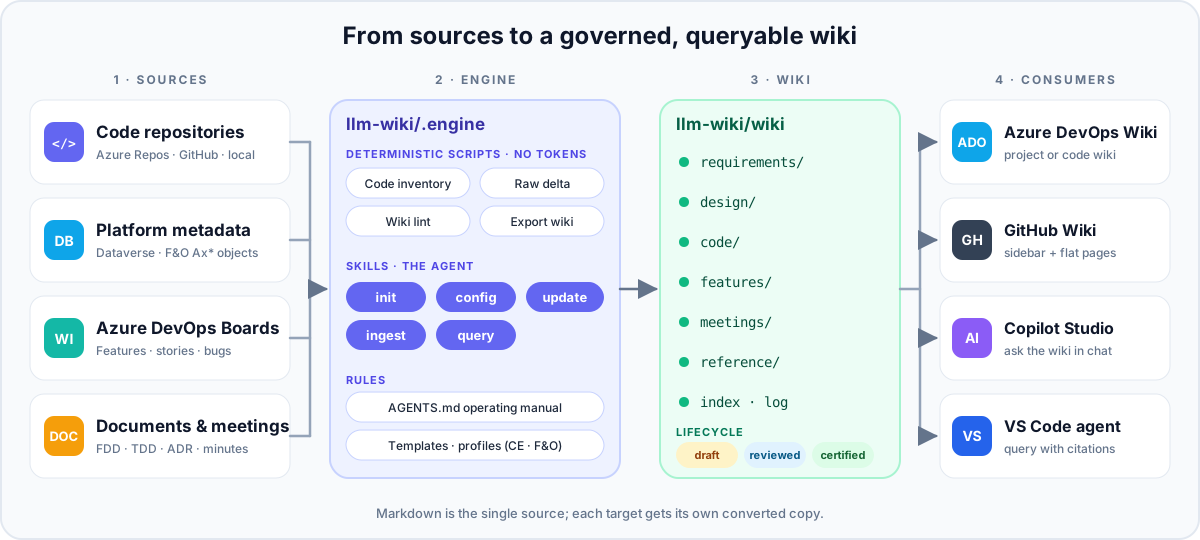
One engine between your sources and your readers.

Un motore tra le tue fonti e chi legge.

Sources are processed by the engine into the wiki, which is published to Azure DevOps Wiki, GitHub Wiki, Copilot and VS Code
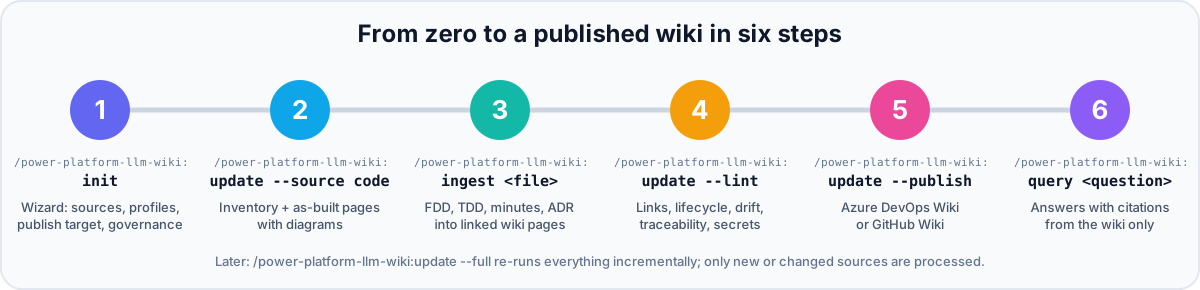
The six steps: /power-platform-llm-wiki:init, :update --source code, :ingest, :update --lint, :update --publish, :query
Get-CodeInventoryPlugins, PCF, flows, pipelines, X++ objects as JSON.Plugin, PCF, flow, pipeline e oggetti X++ in JSON.
Get-RawDeltaHash manifest: only new or changed sources are processed.Manifest di hash: si elaborano solo fonti nuove o modificate.
Test-WikiLintLinks, lifecycle, drift, traceability, overdue actions, secrets.Link, ciclo di vita, drift, tracciabilità, azioni scadute, segreti.
Export-WikiAzure DevOps Wiki or GitHub Wiki, ready to push.Azure DevOps Wiki o GitHub Wiki, pronte al push.
Install-EngineVendors the engine into the project for headless runs.Copia il motore nel progetto per le esecuzioni headless.
Get-WikiGraphKnowledge graph: pages to read, impact, knowledge map, AI pack.Grafo della conoscenza: pagine da leggere, impatti, mappa, pacchetto AI.
0tokens in the mechanical scriptstoken negli script meccanici

Code-first

Trust the code, question the document.

Fidati del codice, metti in dubbio il documento.

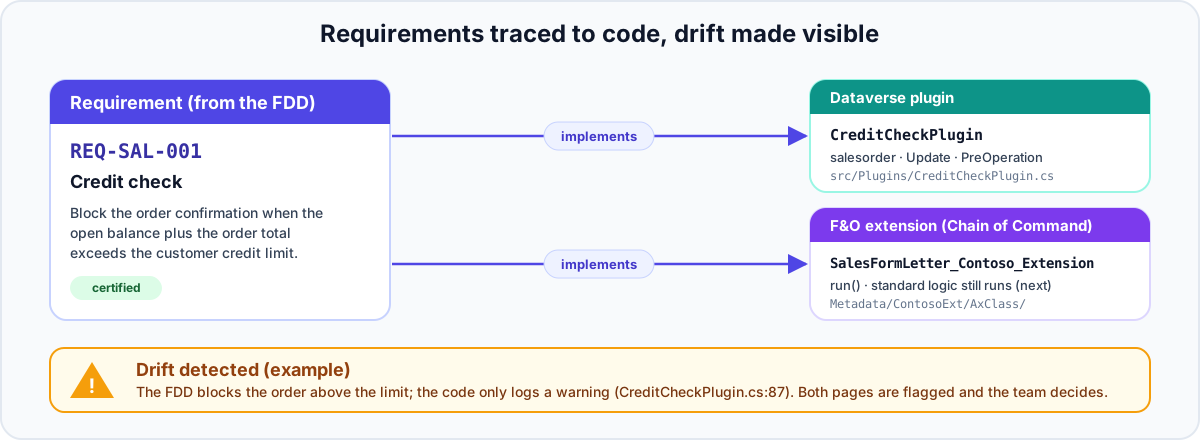
Requirement pages carry an ID, code pages declare what they implement. The lint tells you what is missing, the update flags what disagrees.

Le pagine dei requisiti hanno un ID, le pagine di codice dichiarano cosa implementano. Il lint dice cosa manca, l'update segnala cosa non coincide.

A requirement implemented by a Dataverse plugin and an F&O extension, with a drift warning when the code disagrees
  • Primary source of truth for as-built behaviour: the code, not the document.
  • Fonte primaria dell'as-built: il codice, non il documento.
  • Gaps are flagged on both pages with evidence; nothing is silently rewritten.
  • Le differenze sono segnalate su entrambe le pagine con evidenza; nulla viene riscritto in silenzio.
  • Untraced components and requirements without implementation are listed by the lint.
  • Componenti non tracciati e requisiti senza implementazione sono elencati dal lint.

Governance

Trust you can measure.

Una fiducia misurabile.

Page lifecycle: draft written by the agent, reviewed by a named reviewer, certified by the customer
🧾

Provenance

Provenienza

Every page lists its sources: raw files, work items, commits.

Ogni pagina elenca le sue fonti: file, work item, commit.

🔒

Safe by default

Sicura per default

No secrets in pages, personal data kept to names and roles, Microsoft Entra ID sign-in instead of PATs.

Nessun segreto nelle pagine, dati personali limitati a nomi e ruoli, accesso con Microsoft Entra ID al posto dei PAT.

📊

Measurable

Misurabile

Pages per status, requirement coverage, open drift and tokens per run, ready for the status report.

Pagine per stato, copertura dei requisiti, drift aperti e token per esecuzione, pronti per lo stato avanzamento.

ProfilesProfili

Three ways to read a codebase.

Tre modi di leggere un codebase.

☁️

power-platform

Plugins, PCF, web resources, unpacked solutions, cloud flows, pipelines and live Dataverse metadata via pacx.

Plugin, PCF, web resource, soluzioni unpacked, cloud flow, pipeline e metadati Dataverse via pacx.

🏭

dynamics-fno

Tables and extensions, classes with Chain of Command, data entities, security duties and privileges, model descriptors.

Tabelle ed estensioni, classi con Chain of Command, data entity, duty e privilegi di sicurezza, descrittori dei modelli.

🔌

generic

Azure Functions, APIs and middleware: components, contracts, integrations and release pipelines.

Azure Functions, API e middleware: componenti, contratti, integrazioni e pipeline di rilascio.

Get startedInizia

Up and running in a few minutes.

Operativo in pochi minuti.

  1. Enable plugins in VS CodeAbilita i plugin in VS Code Settings → Chat › Plugins: Enabled.Impostazioni → Chat › Plugins: Enabled.
  2. Add the marketplaceAggiungi il marketplace Add the repository slug to chat.plugins.marketplaces.Aggiungi lo slug del repository a chat.plugins.marketplaces.
  3. Install the pluginInstalla il plugin Extensions → search @agentPlugins power-platform-llm-wiki.Extensions → cerca @agentPlugins power-platform-llm-wiki.
  4. Run /power-platform-llm-wiki:initLancia /power-platform-llm-wiki:init Type the full name, not /init. The wizard configures sources, profiles, publishing and governance.Scrivi il nome completo, non /init. Il wizard configura fonti, profili, pubblicazione e governance.
settings.json
"chat.plugins.enabled": true,
"chat.plugins.marketplaces": [
  "raythekool/power-platform-plugins"
]

Prefer the terminal? GitHub Copilot CLI

Preferisci il terminale? GitHub Copilot CLI

shell
copilot plugin marketplace add raythekool/power-platform-plugins
copilot plugin install power-platform-llm-wiki@power-platform-plugins

No Copilot CLI yet? Install it first: winget install GitHub.Copilot (Windows), brew install --cask copilot-cli (macOS, Linux) or npm install -g @github/copilot (Node.js 22+), then start copilot and type /login. Step by step in the setup wizard.

Non hai ancora Copilot CLI? Installalo prima: winget install GitHub.Copilot (Windows), brew install --cask copilot-cli (macOS, Linux) o npm install -g @github/copilot (Node.js 22+), poi avvia copilot e scrivi /login. Passo passo nel wizard di configurazione.

Claude Code

shell
claude plugin marketplace add raythekool/power-platform-plugins
claude plugin install power-platform-llm-wiki@power-platform-plugins

In a Copilot CLI or Claude Code session the same commands work as /plugin marketplace add and /plugin install. Updates: copilot plugin update power-platform-llm-wiki or claude plugin update power-platform-llm-wiki@power-platform-plugins.

In una sessione di Copilot CLI o Claude Code gli stessi comandi funzionano come /plugin marketplace add e /plugin install. Aggiornamenti: copilot plugin update power-platform-llm-wiki oppure claude plugin update power-platform-llm-wiki@power-platform-plugins.

Want a guided path?Vuoi un percorso guidato? Follow the setup wizard step by step: what to answer to /power-platform-llm-wiki:init, with examples and checks.Segui il wizard di configurazione passo passo: cosa rispondere a /power-platform-llm-wiki:init, con esempi e verifiche.

Requirements: PowerShell 7 and git. Optional per source: Git Credential Manager, pacx/pac, gh, markitdown.

Requisiti: PowerShell 7 e git. Opzionali in base alle fonti: Git Credential Manager, pacx/pac, gh, markitdown.

FAQ

Good questions.

Domande frequenti.

Do I need a personal access token?Serve un personal access token?

No. Azure DevOps uses Microsoft Entra ID sign-in through the MCP server, and publishing uses Git Credential Manager. CI runs use repository secrets.

No. Azure DevOps usa l'accesso Microsoft Entra ID tramite il server MCP e la pubblicazione usa Git Credential Manager. Le esecuzioni in CI usano i secret del repository.

Where does the wiki live?Dove vive la wiki?

In the project repository, under llm-wiki/, as plain Markdown. The published wiki is a converted copy.

Nel repository del progetto, in llm-wiki/, come Markdown semplice. La wiki pubblicata è una copia convertita.

What if people only use Azure DevOps or Copilot?E se le persone usano solo Azure DevOps o Copilot?

They read the published wiki, or ask it through Microsoft 365 Copilot / Copilot Studio connected to that wiki. VS Code is only needed by the people who maintain it.

Leggono la wiki pubblicata, oppure la interrogano tramite Microsoft 365 Copilot / Copilot Studio collegati alla wiki. VS Code serve solo a chi la mantiene.

Can the agent change certified pages?L'agente può modificare le pagine certificate?

No. New information is added as a "Pending updates" section for the page owner to accept or reject.

No. Le nuove informazioni vengono aggiunte come sezione "Pending updates" che l'owner della pagina accetta o rifiuta.

How do I keep costs under control?Come tengo sotto controllo i costi?

Only changed sources are processed, scripts replace LLM reading wherever possible, and each log entry records the volume processed.

Si elaborano solo le fonti cambiate, gli script sostituiscono la lettura dell'LLM dove possibile e ogni voce di log registra il volume elaborato.

Make documentation the easy part of delivery.

Rendi la documentazione la parte facile della delivery.